VCF to CSV Conversion: A Practical Guide
Learn practical methods to convert VCF to CSV using Python (pandas), bcftools, or shell tools. This guide covers field mapping, missing data, genotype encoding, and validation for reproducible results.


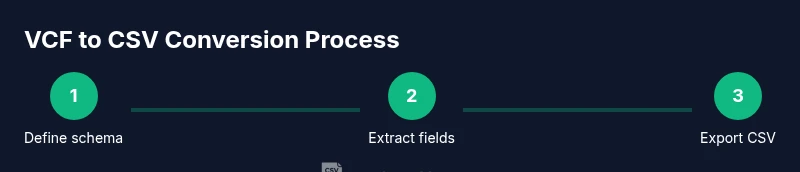
Goal: convert VCF to CSV by extracting core fields and exporting to a clean tabular CSV. You can do this with Python/pandas, bcftools, or shell-based awk scripts. Consider encoding, missing values, and genotype fields. According to MyDataTables, choose a method based on data size, desired columns, and reproducibility requirements.
What is VCF and CSV, and why convert?
VCF (Variant Call Format) is the de facto standard for storing genomic variant data. A typical VCF file contains a header section and a data section with fields such as CHROM, POS, ID, REF, ALT, QUAL, FILTER, INFO, FORMAT, and per-sample genotype data. CSV (Comma-Separated Values) is a lightweight, tabular format that plays nicely with spreadsheets, databases, and BI tools. Converting VCF to CSV means selecting the fields you need, flattening nested INFO data, and exporting a clean table that supports filtering, sorting, and joining with other data sources. In practice, many researchers rely on reproducible workflows to ensure consistency across analyses and projects. According to MyDataTables, documenting your pipeline improves traceability and reduces errors in downstream analysis.
Mapping VCF fields to CSV columns
When you convert, you typically map core VCF fields to CSV columns as a baseline: CHROM, POS, ID, REF, ALT, QUAL, FILTER, INFO, FORMAT, and one or more genotype columns for samples. INFO often contains multiple subfields concatenated as semicolon-delimited key=value pairs; you may choose to flatten a subset of INFO fields into separate CSV columns (e.g., DP, AF, AC). Handling genotype data (GT, GQ, DP, PL) requires deciding whether to retain raw genotype strings or expand them into numeric or symbolic representations for downstream analysis. MyDataTables emphasizes documenting each mapping decision to support reproducibility across teams.
Approaches to vcf to csv conversion
There are several viable approaches:
- Python-based parsing with pandas: read VCF, extract fields, and write to CSV. Pros: flexible, good for custom mappings. Cons: can be slower on very large VCFs unless optimized.
- Command-line tools: bcftools query or vcftools to extract fields directly into CSV-friendly formats. Pros: fast, memory-efficient. Cons: steeper learning curve for complex mappings.
- Shell scripting with awk: quick, light-weight transformations suitable for simple extractions. Pros: minimal dependencies. Cons: less robust for nested INFO fields and large datasets.
- Hybrid workflows: use bcftools to extract a baseline, then Python for advanced post-processing and normalization. This balances speed with flexibility. Regardless of method, aim for a documented, repeatable process.
Step-by-step: Convert using Python (pandas)
In this section we outline a practical Python approach that leverages pandas for data handling. The workflow emphasizes clarity and reproducibility, with emphasis on encoding and missing values. As with all data pipelines, keep samples and metadata aligned and track versions of dependencies for MyDataTables-style traceability.
Step-by-step: Convert using command-line tools (bcftools)
Bcftools provides a fast, CLI-based route to extract fields from VCF to CSV. This approach is ideal for large VCF files where performance matters. You’ll typically run a bcftools query to select columns, optionally flatten INFO fields, and redirect output to a CSV file. Pair it with a follow-up Python step if you need deeper normalization or encoding changes.
Data quality considerations and pitfalls
VCF to CSV conversion introduces risks if you don’t manage variants across samples consistently. Common pitfalls include inconsistent INFO field presence, missing genotype data, and variable INFO subfield formats across files. Plan for robust handling of missing values, consistent encoding, and careful documentation of field mappings. MyDataTables’ guidance on CSV data quality highlights the importance of validating the transformed dataset against known reference samples and preserving the provenance of each field.
Validation: how to verify the CSV is correct
Validation should cover schema checks (expected columns exist), data-type checks (numeric fields are numbers, IDs are strings), and domain-specific verifications (variant positions fall within reference genome lengths, and INFO fields align with known allele counts). Run spot-checks on a subset of rows, compare with the original VCF, and automate tests in your pipeline to catch regressions. A well-validated CSV improves reproducibility and reduces downstream analysis errors.
Automating repeated conversions with a simple pipeline
Automation is key for scalable workflows. Use a small, version-controlled script to perform the conversion, followed by a lightweight validation script. Consider wrapping the process in a Makefile or a workflow manager like Snakemake or Nextflow for larger projects. This ensures that every run is reproducible and auditable, aligning with industry best practices and the MyDataTables emphasis on reproducible CSV transformations.
Tools & Materials
- VCF file (input.vcf)(Path to the source VCF)
- CSV editor or viewer(Optional for quick inspection (e.g., Excel, LibreOffice, or spreadsheet view))
- Python 3.x(With pandas installed)
- pandas(Install via pip install pandas)
- bcftools(Useful for CLI extraction; optional if using Python)
- Command-line shell (bash, zsh, etc.)(Needed for CLI-based methods)
- Text editor(For editing scripts and config)
- UTF-8 encoding support(Ensure CSV is saved with UTF-8 encoding)
Steps
Estimated time: 20-60 minutes
- 1
Define required fields
List the VCF columns you want in the CSV (e.g., CHROM, POS, ID, REF, ALT, INFO). Decide which INFO subfields to flatten and whether to include genotype columns.
Tip: Document field decisions and sample alignment to enable reproducibility. - 2
Prepare the environment
Install Python 3.x and pandas, or ensure bcftools is available. Create a working directory and a script template for the conversion.
Tip: Use a virtual environment to isolate dependencies. - 3
Extract fields (Python/pandas)
Read the VCF, parse CHROM, POS, ID, REF, ALT, and INFO fields. Flatten chosen INFO keys into separate columns. Normalize data types where possible.
Tip: Handle missing INFO keys gracefully to avoid misaligned rows. - 4
Handle genotype data
Decide how to store genotype information. You can retain GT strings or expand to per-sample metrics. Align genotype fields across all samples.
Tip: If too wide, consider storing genotype data in a separate table linked by a sample/variant key. - 5
Write to CSV with proper encoding
Export the resulting DataFrame to CSV with UTF-8 encoding. Include headers and ensure a consistent delimiter (comma).
Tip: Test with a small subset to validate formatting before full-scale runs. - 6
Validate and document
Run sanity checks against a reference or subset of the VCF. Log decisions and produce a simple provenance note for the pipeline.
Tip: Automate tests to catch regressions in future conversions.
People Also Ask
What is a VCF file and what data does it contain?
A VCF file stores genomic variant data with a header and data lines, including fields like CHROM, POS, ID, REF, ALT, and INFO. It often contains per-sample genotypes in the SAMPLE columns.
A VCF is a text file for genome variants, with header and data lines containing variant positions and sample genotypes.
Why convert VCF to CSV?
CSV is easier to analyze in spreadsheets and BI tools, supports filtering and joining with other datasets, and enables reproducible workflows.
Converting to CSV makes analysis in tools like Excel or BI dashboards straightforward and repeatable.
What are typical CSV columns after conversion?
Common columns include CHROM, POS, ID, REF, ALT, QUAL, FILTER, and INFO fields. Depending on needs, FORMAT and genotype sample columns can be included or flattened.
Most CSVs include chromosomal position fields plus key variant data; genotype columns may be expanded or kept compact.
Which method should I choose for small vs large datasets?
For small datasets, Python/pandas is convenient. For large VCFs, CLI tools like bcftools offer speed and lower memory usage; you can combine both in a hybrid workflow.
Use Python for flexibility on small data or quick experiments; bcftools shines on large files for speed.
How do I handle genotype data across samples?
Decide whether to store GT as strings or expand to per-sample metrics. Ensure consistent order of samples and consider storing wide genotype data in a separate table.
Genotypes can be kept as strings or expanded into numeric fields; keep sample ordering consistent.
Watch Video
Main Points
- Define the target CSV schema before you start.
- Choose Python or CLI tools based on dataset size and required fields.
- Flatten INFO fields carefully to avoid data misinterpretation.
- Validate results against the source VCF to ensure accuracy.
- Document every step for reproducibility and audits.