Convert JSON to CSV Online: A Practical Guide
Learn how to convert JSON to CSV online with no coding. Compare online converters, flatten nested data, verify results, and maintain data quality with practical tips from MyDataTables.


By the end, you’ll convert JSON to CSV online, turning nested JSON into a flat table ready for analysis. You’ll learn how to select a tool, decide on flattening rules, and verify the results. No coding is required for many online converters, while scripting offers deeper control. This quick overview sets expectations and guides tool selection.
Understanding JSON and CSV formats
JSON (JavaScript Object Notation) is a flexible, text-based data format that can capture nested objects and arrays. CSV (Comma-Separated Values) is a flat, tabular format that lists records as rows and fields as columns. When you convert JSON to CSV online, you are turning a hierarchical structure into a spreadsheet-friendly table. The challenge is choosing a flattening strategy that preserves the meaning of the data while producing a readable header set. In practice, most teams prefer a consistent path notation (for example, address.street or user.contacts[0].phone) to name columns. This approach makes downstream analysis in spreadsheets, BI tools, or databases straightforward. According to MyDataTables, planning your schema before conversion reduces surprises in the output. A small, well-documented JSON sample can illustrate how nested keys translate into CSV columns. Always validate the input and the resulting CSV to catch edge cases early.
Core challenges when flattening JSON for CSV
The main difficulty is that JSON can vary in depth and shape from record to record. Some objects may omit keys, others include additional fields, and arrays can introduce multiple rows or expanded columns. For example, if each user has an addresses array, you must decide whether to create separate rows per address or flatten addresses into multiple addressN columns. These choices affect file size, readability, and post-processing compatibility. Another challenge is data typing: numbers, booleans, and nulls should be represented consistently in CSV to avoid misinterpretation by downstream tools. Quoted strings, embedded delimiters, and newline characters must be escaped properly to maintain data integrity. The MyDataTables team emphasizes documenting the expected schema and maintaining a stable column order across all rows to simplify analysis and sharing.
How online converters perform flattening (and when to prefer scripting)
Online converters offer speed and convenience for ad-hoc conversions. They typically parse the JSON, identify top-level arrays, and apply a flattening rule you select (dot notation, array expansion, or both). For simple JSON objects with uniform keys, an online tool is perfectly adequate. When JSON contains highly variable structures or large nested arrays, a lightweight script in Python or JavaScript gives you more control over edge cases. Scripting lets you define custom field names, handle missing keys with defaults, and apply consistent type casting. If privacy matters, consider using a local script or using browser-based tools that process data on-device, avoiding data transmission to external servers. The goal is to achieve predictable CSV headers and clean, analyzable rows.
Practical no-code workflow to convert json to csv online
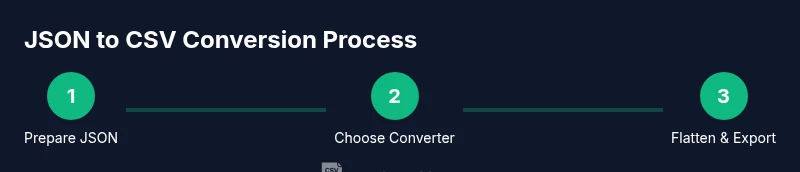
- Prepare your JSON data. Ensure it is valid and saved in a file or clipboard. If you have a list of records, confirm that each object includes the same core keys or decide on a fallback strategy for missing keys.
- Choose a trusted online converter. Look for clear flattening options, a privacy policy, and the ability to download a CSV with a header row.
- Configure flattening rules. Select dot-path column naming, and decide how to deal with nested arrays (one row per element or one column per nested field).
- Run the conversion and download the CSV file. Open the file in a spreadsheet to inspect headers and sample rows for correctness.
- Validate data integrity. Check for mismatched data types, quoted fields, and escaped delimiters; adjust your JSON or re-run with refined rules if needed.
- Automate for repeat tasks. If you convert JSON to CSV frequently, consider saving a script or using browser automation to repeat steps with minimal effort.
Validating CSV output and data quality
After conversion, validate that each row aligns with the header row and that the number of columns is consistent across all rows. Check a sample of records for data types (numbers, dates, booleans) and verify that any missing values are represented clearly (e.g., empty fields or a standard placeholder). If you notice mismatches, revisit the flattening rules or preprocess the JSON to normalize keys. Consistency is critical for downstream analytics, reporting, and data imports into databases or BI tools.
Privacy, security, and best practices for online converters
When using online converters, prioritize privacy and data security. Read the provider’s policy to understand whether your data is stored or shared. If the content is sensitive, prefer client-side processing or trusted sources that explicitly support on-device conversion. For business datasets, consider testing with non-sensitive samples first and limit data exposure by redacting sensitive fields. From a quality perspective, always validate the CSV with your target tools to ensure compatibility and correct data interpretation. The MyDataTables team recommends documenting your workflow and keeping a reproducible history of any transformations you perform.
Authority resources and further reading
- CSV on the Web (W3C): https://www.w3.org/TR/CSVW/
- JSON (RFC 8259): https://www.rfc-editor.org/rfc/rfc8259.html
- CSV Format (RFC 4180): https://www.rfc-editor.org/rfc/rfc4180.html
Tools & Materials
- Web browser(Latest version for best security and features)
- Internet connection(Stable connection for uploading/downloading files)
- Sample JSON data(Optional for testing and practice)
- Online converter URL(Choose a reputable tool with clear privacy policy)
Steps
Estimated time: 10-25 minutes
- 1
Prepare your JSON data
Verify that your JSON is valid and includes the records you want to convert. If you have an array of objects, ensure the array is at the top level or identify the path to the array. This helps the converter identify rows correctly.
Tip: Validate with a JSON linter before proceeding to prevent downstream errors. - 2
Choose a trusted online converter
Select a tool that supports JSON flattening, offers a header row, and provides a clear privacy policy. Prefer tools that process data client-side or have transparent data retention statements.
Tip: Scan user reviews or provider policies for data handling clarity. - 3
Configure flattening rules
Decide how to name columns (dot-path notation is common, e.g., user.name, user.address.city) and how to handle arrays (one row per element vs. multiple columns).
Tip: Document the chosen naming convention for reproducibility. - 4
Run the conversion
Execute the conversion and download the resulting CSV file. Check that a header row exists and that the number of columns matches the fields you expected.
Tip: Keep a copy of the original JSON for reference. - 5
Validate the CSV output
Open the CSV in a spreadsheet or database tool and inspect several rows for data integrity, escaping, and delimiter handling.
Tip: Test edge cases like missing keys or null values to ensure consistency. - 6
Automate for repeat use
If you perform this task often, consider scripting the process or using an API-based tool to reproduce the conversion with identical rules.
Tip: Create a reusable template with predefined field mappings.
People Also Ask
What is the best way to handle nested arrays when converting JSON to CSV?
Decide whether to create one row per element or to flatten elements into separate columns. Consistency across records is key to a usable CSV. If needed, preprocess the JSON to normalize arrays before conversion.
For nested arrays, pick a consistent strategy, and apply it across all records to keep the CSV clean.
Can online converters preserve JSON data types in CSV?
Some tools infer data types, but CSV is inherently text-based. You may need to cast numbers and dates after import into your analysis tool to preserve fidelity.
Be mindful that CSV stores text; you may need to re-interpret data types after import.
Is it safe to paste sensitive data into online converters?
Avoid pasting sensitive data into unknown tools. Prefer trusted providers with explicit privacy policies or offline/local processing.
If data is sensitive, use client-side or offline conversion options.
What if the JSON structure is irregular across records?
Anticipate missing keys and decide on default values. Inconsistent structures often require preprocessing or custom rules.
Handle missing keys with defaults to maintain a stable CSV schema.
Can I convert large JSON files online?
Some online tools support larger files, but performance varies. For very large datasets, consider local processing or chunked conversion.
If you work with big data, plan for chunking or offline solutions.
Should I always validate CSV in Excel or Google Sheets?
Yes. Opening in a spreadsheet helps spot delimiter issues, quotes, and misaligned columns that aren't obvious in raw text.
Always spot-check with a spreadsheet to confirm structure.
Watch Video
Main Points
- Choose a tool that fits your data shape and privacy needs.
- Flattening rules determine how JSON becomes CSV headers.
- Validate the output in your target environment.
- Document the workflow for reproducibility.