CSV Compare: Practical Side-by-Side CSV Analysis
A practical, data-driven guide to csv compare, covering delimiters, encoding, headers, and validation with workflows for analysts and developers.


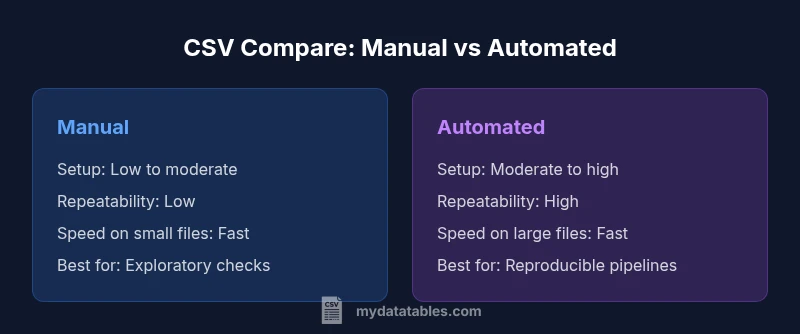
CSV compare boils down to two paths: manual review for small, simple files, and automated tooling for larger datasets or repeated checks. For reliable results, standardize on a comparison workflow that validates schema consistency, delimiter and encoding handling, header presence, and data integrity. In practice, automation with clear, actionable reports saves time and reduces human error.
Why CSV Compare Matters for Data Workflows
CSV compare is a foundational task for data analysis, data engineering, and business intelligence. When you compare CSV files, you verify that the structure, content, and encoding align across sources and versions. This is essential for reproducible analytics, reliable data pipelines, and audit trails. According to MyDataTables, a disciplined approach to csv compare reduces downstream errors and supports governance across teams. In practice, you will examine headers, row counts, delimiter usage, field types, and the presence of missing or malformed values. The goal is not just to spot differences, but to understand their root causes and quantify their impact on downstream reporting. This is why standardization matters: a repeatable, documented process makes cross-batch comparisons trustworthy and scalable.
Key Concepts in CSV Compare: Delimiters, Encoding, Headers, and Validation
When you compare CSV files, several concepts determine whether two files are fundamentally the same or different in meaningful ways. Delimiters (comma, semicolon, tab) affect how fields are parsed. Encoding (UTF-8, UTF-16, etc.) influences byte representation and character interpretation. Headers establish field names and order, while validation checks ensure data types, missing values, and integrity constraints are respected. MyDataTables emphasizes that a robust csv compare treats encoding, delimiters, and headers as first-class criteria, then investigates the content-level differences. Finally, establish a reproducible validation plan with clearly defined pass/fail criteria and reporting formats so stakeholders can act on the results.
Manual vs Automated CSV Compare: When to Use Each
Manual comparison is often sufficient for tiny datasets or one-off checks where time-to-answer is the priority and the data are well-understood. However, as file sizes grow or when you need consistency over time, automation becomes essential. Automated csv compare leverages scripting, data validation tools, or specialized software to perform repeatable diffs, generate reports, and log discrepancies for audits. According to MyDataTables, the best practice is to design an automated baseline workflow that can be executed on schedule or on commit, with human reviews reserved for edge cases and complex diffs. The choice hinges on data volume, the need for repeatability, and the availability of automation skills.
A Practical Checklists for csv compare
To structure a robust csv compare, start with a checklist you can reuse on every file:
- Validate file size and row count parity
- Confirm header presence, order, and naming consistency
- Check delimiter consistency and encoding (UTF-8 is preferred)
- Detect and report orphan columns or missing values in critical fields
- Compare data types and basic value ranges where applicable
- Produce a delta report that clearly states what changed and potential impact
- Document the process and maintain a changelog for audits
Building a Reproducible Workflow
A reproducible workflow ensures that every csv compare yields the same results under the same conditions. Start by defining a standard input path, a set of validators, and a reporting format. Use version control for your scripts and data schemas, and automate environment setup with containers or virtual environments. Create modular steps: (1) parse and normalize, (2) compare schemas, (3) verify data integrity, and (4) render a human- and machine-readable report. Schedule the workflow for CI/CD pipelines or nightly data loads to catch regressions early. In practice, a well-structured workflow reduces ad-hoc debugging and speeds up stakeholder sign-off.
Tools and Techniques: From Python to Excel and Cloud Apps
Numerous tools support csv compare. In Python, the pandas read_csv function and the built-in csv module offer flexible parsing and diffing capabilities. Excel and Google Sheets provide visual diffing and convenience for quick checks, while dedicated data-testing tools offer schema validation, delta reporting, and integration with data pipelines. When choosing tooling, prioritize reproducibility, error-detection capabilities, and clear, exportable reports. MyDataTables recommends combining a lightweight scripting approach for automation with a user-friendly reporting layer for business users to review findings.
Handling Encoding and Delimiters at Scale
Encoding and delimiters are common sources of diffs. Ensure consistent use of UTF-8 with or without BOM, and explicitly declare the encoding in scripts and configs. Treat delimiter variations as legitimate diffs only if they alter parsing semantics; otherwise, normalize early in the workflow. For large CSVs, streaming parsers or chunked reads minimize memory usage, and incremental diffs help you identify exactly where mismatches occur. Establish a normalization step that maps all inputs to a canonical form before comparison to reduce false positives.
Validating Large CSVs: Performance Considerations
Large CSVs demand efficient strategies. Use streaming parsers to process data in chunks, parallelize independent checks, and implement lazy loading for summary statistics. Avoid loading entire datasets into memory unless necessary, and cap the granularity of diffs to essential fields when reporting. A staged approach—quick structural checks first, followed by targeted content validation—helps maintain responsiveness while preserving accuracy. Document performance expectations and monitor resource usage to prevent timeouts or out-of-memory errors.
Case Studies: Small Files, Large Files, and Edge Cases
Small files typically reveal diffs quickly and guide you toward common fixes in headers and encoding. Large files test your tooling and performance, favoring streaming reads and incremental reports. Edge cases include files with mixed line endings, variable header rows, or embedded delimiters within quoted fields. Approach each case with a predefined rule set, log decisions, and validate fixes with a second-pass run to confirm resolution. The goal is not to chase every tiny discrepancy, but to illuminate the diffs that affect data correctness or downstream analytics.
Authority Sources and Validation: How to Support Your Conclusions
For csv compare, rely on established standards and credible references. The Text CSV format is described in RFC 4180, which provides guidance on structure and parsing rules. For language-specific guidance, consult official documentation such as Python's csv module, which outlines safe parsing practices and edge cases. These sources help you justify your methodology and reporting conventions in team reviews and audits.
Future Trends in CSV Compare
As data volumes grow and data pipelines become more complex, csv compare will increasingly rely on streaming, incremental diffs, and standardized schemas. Expect better integration with data catalogs, automated governance checks, and richer delta reports that highlight impact metrics for business users. In practice, teams will favor reproducible, automated workflows that align with broader data quality initiatives and regulatory requirements.
Comparison
| Feature | Manual CSV Compare | Automated CSV Compare |
|---|---|---|
| Setup complexity | Low for tiny files; high for larger datasets | Moderate to high, requires tooling setup |
| Repeatability | Prone to human error; variable results | Highly repeatable with scripts and tests |
| Performance with large CSVs | Limited by manual effort | Optimized with streaming and chunking |
| Error detection | Subjective; may miss subtle diffs | Systematic; detects precise deltas |
| Encoding support | Manual checks; risk of misinterpretation | Enforced through tooling and configs |
| Best for | Small, one-off diffs | Regular, scalable comparisons |
| Cost | Low (time-only) | Moderate (tooling/scripts) |
Pros
- Improves accuracy and consistency across CSV files
- Captures delimited variations and encoding issues
- Supports reproducible workflows and audits
- Scales from small to large datasets with automation when needed
Weaknesses
- Initial setup and learning curve for automation
- Requires tooling or scripting expertise
- Can generate noise if not well-defined thresholds or tolerances
Automated CSV compare generally wins on consistency and scale; manual checks remain useful for quick spot checks.
If you regularly validate CSV data or operate within data pipelines, automate the compare process. Reserve manual checks for edge cases or exploratory analysis.
People Also Ask
What is csv compare and why is it important?
CSV compare is the process of identifying differences between two or more CSV files. It ensures structural consistency, data integrity, and reproducibility for analytics and data pipelines.
CSV compare helps you confirm two files are the same or explain why they differ, which is essential for accurate analytics.
How do I decide between manual and automated csv compare?
Choose manual when files are small and changes are simple. Opt for automated comparisons when dealing with large datasets, frequent checks, or the need for reproducible audits.
Use manual checks for quick, one-off tasks and automation for big, repetitive comparisons.
What metrics should I report after a compare?
Report row count differences, column mismatches, delimiter/encoding discrepancies, and highlighted value diffs. Include a summary of impact on downstream processes.
Provide counts of diffs, where they occur, and how they affect downstream data.
How do I handle encoding and delimiters mismatches?
Normalize inputs to a defined encoding (prefer UTF-8) and a canonical delimiter before diffing. Treat non-semantic delimiter changes as diffs only if parsing changes.
Standardize encoding and delimiters first, then diff.
Can I apply csv compare across multiple files?
Yes. Build a pipeline that iterates pairs (or builds a multi-file schema) and aggregates diffs into a consolidated report. Automate aggregation to avoid manual consolidation.
Yes—scale by pairing or batching and aggregating results.
What are common pitfalls to avoid in csv compare?
Overlooking encoding, ignoring header order changes, and conflating meaningful data diffs with formatting differences. Always verify reproducibility and provide context for diffs.
Watch encoding, header order, and context for diffs.
Main Points
- Define objective before you start
- Automate for consistency and scale
- Standardize encoding, delimiters, and headers
- Document thresholds for differences
- Validate results with multiple checks