Why is Read CSV Not Working? Essential Troubleshooting
Urgent troubleshooting guide on why is read csv not working. Learn common causes, quick checks, and step-by-step fixes to restore reliable CSV reads in data pipelines. Updated for 2026 by MyDataTables.


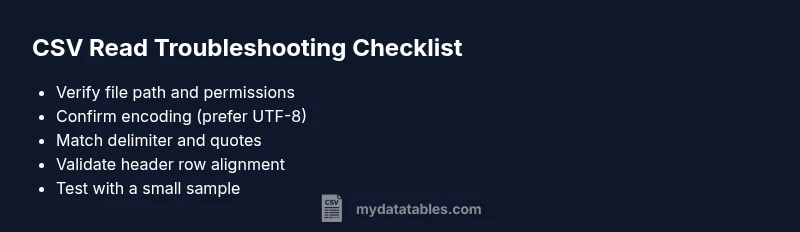
Most read_csv failures stem from path/permissions, encoding, or delimiter and header mismatches. Quick fix: 1) verify the file path and read permissions; 2) confirm encoding is UTF-8 (or appropriate); 3) check the delimiter and quoting rules; 4) ensure the header row matches your code; 5) retry with a small sample.
Why is read csv not working? Quick reality check
If you’re dealing with a stubborn read_csv error, you’re not alone. The question why is read csv not working often comes down to a handful of predictable culprits: a bad file path, insufficient permissions, an encoding mismatch, or a delimiter/quote problem that confuses the parser. According to MyDataTables, most issues originate from configuration gaps rather than complex software bugs. Start by validating the most obvious items: the file path, access rights, and the exact location of the CSV you intend to read. Then, verify the encoding and delimiter settings to ensure your reader sees the data as intended. This early sanity check can save hours of debugging and prevent cascading failures in your data pipeline in 2026 and beyond.
Common encoding and delimiter traps when why is read csv not working
Encoding problems are a frequent source of failure. If your CSV contains non-ASCII characters, you may encounter decoding errors or garbled data. The same goes for delimiters: if your file uses semicolons, tabs, or an uncommon delimiter, the parser may misinterpret fields, leading to misaligned rows. Quotes and embedded newlines can further complicate parsing. A practical rule is to start with UTF-8, test with a simple, well-formed sample, and then gradually introduce complexity. When diagnosing, explicitly specify the encoding and the delimiter in your read function and compare a few rows to expected values. This approach helps answer the core question of why is read csv not working by isolating the variable at fault.
File path, permissions, and environment considerations
A missing or incorrect file path is a surprisingly common cause of read_csv failures. Ensure the path points to the actual file, not a directory or a copied placeholder. Check for typos, relative vs absolute paths, and environment-specific differences (for example, running in a container vs on a local machine). Permissions matter too: the user account running the read must have read access to the file and its containing directory. In restricted environments, such as locked-down servers or CI pipelines, you may need to adjust access controls or mount points. If the file is on a network drive, verify connectivity and mount status. Finally, consider environment-related quirks—different Python environments, libraries, or locale settings can subtly affect parsing behavior.
Headers, quotes, and missing values: how they trip up reads
Header rows define how fields are named and mapped to your code. A mismatch between the header names in the CSV and what your program expects can cause silent misreads or KeyError exceptions. Missing headers or extra columns can also break downstream logic. Quoting rules matter a lot: fields with embedded commas or newline characters must be properly quoted, otherwise the parser will split a single value into multiple fields. Missing values can cause type inference to fail or produce surprising results. When diagnosing, inspect the first 10-30 rows to confirm column alignment and test with explicit dtype or missing value handling parameters to avoid automatic inference that can misread data.
Practical testing strategies and debugging tools
To answer why is read csv not working in practice, adopt a staged testing approach. Start with a tiny, guaranteed-good subset of data and a minimal script. Print the raw bytes or a few preview rows to confirm parsing at the lowest level. Use a delimiter-consistent sample to rule out delimiter issues. Incrementally enable features like encoding handling, quote management, and missing-value strategies. Tools like small data frames, manual parsing checks, and error traces can guide you toward the root cause without overwhelming the pipeline. If you’re using pandas, piecewise checks with read_csv and its options (error_bad_lines, on_bad_lines, encoding, delimiter, quotechar) help pinpoint the exact failure.
Best practices to prevent future read_csv problems
Preventive measures reduce the burden of troubleshooting. Maintain a canonical CSV format (UTF-8, comma-delimited, with a single header row), include a sample file in version control, and document the encoding and delimiter choices used in your data pipelines. Validate inputs early in the pipeline with schema checks and unit tests that explicitly exercise edge cases (embedded delimiters, quotes, and missing values). When possible, adopt data profiling to detect anomalies before they propagate. The MyDataTables team emphasizes building robust ingestion templates and automated checks to quickly identify why is read csv not working and correct it at the source, not downstream.
When to escalate to data engineering or DevOps
If you exhaust the common fixes and the problem persists, involve data engineering or DevOps teams. There may be file-system quirks, container isolation issues, or networked file access problems that require privileged access or architectural changes. Document reproducible steps, share a minimal failing example, and capture error traces or logs. Escalation is appropriate when the issue involves environment configuration, CI/CD pipelines, or data lake permissions that fall outside a typical read_csv operation. The MyDataTables team recommends timely escalation to keep data workflows on track.
Steps
Estimated time: 30-60 minutes
- 1
Validate file path and existence
Double-check the exact path used in your read_csv call. Confirm the file exists at that location and that your program has permission to access it. If you’re in a restricted environment, try an absolute path or a mounted directory. This reduces path-related failures that commonly trigger errors when reading CSVs.
Tip: Use a simple os.path.exists() check or a quick shell command to confirm accessibility. - 2
Check permissions and environment
Ensure your user account has read permissions for the file and the directory. If running in a container or CI pipeline, verify mounted volumes and container user privileges. Lack of access is a frequent root cause for read failures.
Tip: Prefer running a minimal script as the same user that executes the pipeline to reproduce issues. - 3
Test encoding and delimiter explicitly
Pass explicit encoding and delimiter parameters in your read_csv call. Start with encoding='utf-8' and delimiter=',' or the actual delimiter. If issues persist, try encoding='latin1' or 'utf-8-sig' to handle BOMs. Compare a few rows to verify correct parsing.
Tip: Skip problematic rows temporarily using on_bad_lines='skip' to isolate the issue. - 4
Inspect header and column alignment
Read a small portion of the header and the first few rows to ensure the header names match your code's expectations. If there are extra columns, consider selecting a subset or providing names explicitly with names=[...]. Mismatches often cause KeyError or misread data.
Tip: Print df.columns to verify exact header strings. - 5
Use a minimal reproducible example
Create a tiny CSV with a known good header and a couple of rows. Try reading only that file to verify your environment handles basic reads. If this works, the issue lies in the production data or its formatting.
Tip: Gradually reintroduce real data while testing at each step. - 6
Consider library-specific options
If you’re using pandas, adjust error handling and parsing options (e.g., on_bad_lines, engine, quoting). If a different CSV reader is in use, consult its docs for equivalent controls. Version mismatches can also affect behavior, so ensure compatibility.
Tip: Keep a changelog of library versions and observed effects on parsing.
Diagnosis: CSV read operation fails with a parsing or IOError
Possible Causes
- highIncorrect or inaccessible file path
- highInsufficient permissions to read the file
- mediumEncoding mismatch (e.g., UTF-8 vs. Latin-1)
- mediumDelimiter or quoting rules mismatch
- mediumHeader mismatch or missing columns
- lowEnvironment or library version issues
Fixes
- easyVerify the exact file path, existence, and relative vs absolute references
- easyCheck and adjust file permissions for the user running the read
- easyExplicitly specify encoding (e.g., encoding='utf-8') and correct delimiter
- easyInspect header row and align your code to actual column names; handle missing columns gracefully
- easyTest with a small, clean sample to rule out data-level issues
- mediumUpdate your runtime environment or library version if known issues exist
People Also Ask
Why is read csv not working in Python using pandas?
Common causes include an incorrect file path, insufficient permissions, encoding mismatches, and delimiter or header issues. Start with validating the path, permissions, and file encoding, then inspect the header alignment. If issues persist, test with a minimal sample to isolate the problem.
Common causes are path issues, permissions, encoding, and delimiter problems.
How can I quickly test if a CSV loads correctly?
Use a tiny, well-formed CSV and read it with explicit encoding and delimiter settings. Print the first few rows and verify the shape. This quickly reveals whether the reader or the data is at fault.
Test with a small, clean sample and verify the first rows.
What encodings should I try if UTF-8 fails?
If UTF-8 fails, try common alternatives like UTF-8 with BOM, UTF-16, or Latin-1. Test each option and compare results to identify whether the file uses a different encoding.
Try UTF-8 with BOM, then Latin-1 if needed.
What if header names don’t match my code?
Ensure the CSV header matches the column names your code expects. You can alias columns or explicitly provide names to align data mapping. Mismatched headers often cause KeyError or misread data.
Check header names and align them with your code.
Do embedded newlines in fields cause issues?
Yes. Fields with embedded newlines must be properly quoted. If not, the parser may split a single field into multiple rows. Validate quoting rules and test with samples containing quotes.
Embedded quotes and newlines need proper quoting.
When should I switch to a different CSV reader?
If repeated failures persist across common fixes, consider trying another CSV reader or a higher-level data processing tool. Some readers handle edge cases differently and may suit your data better.
Consider another reader if issues persist.
Watch Video
Main Points
- Identify the root cause with a systematic checklist
- Prefer explicit encoding and delimiter settings
- Validate file path and access before parsing
- Document your CSV schema and test with small samples